Skills Gap 3: 3D Character Controller
- 723799
- Nov 14, 2023
- 4 min read

For my third skills gap I will be creating a 3D character controller script with C# to move my animated character model around in unity. (The model I made in my previous skills gap.)
Before I start, I should preface that the week I was supposed to do this skills gap was full of unfortunate circumstances that meant I had to start this late.
I found a guide, that I could follow to make a script to move my animated 3D model around, by Imphenzia:

Before that though I have to import my model into Unity.
I first tried to do it myself by just exporting my model as an FBX file and just using it in Unity. While that kind of worked instantly, it had some notable problems.
For whatever reason the head of my character was weirdly warped and was sticking out of the top of its hair.


Other problems also included the hair and earrings not moving with the body and some of the materials not importing properly. But I decided I could solve those later.
Firstly, I tried tweaking stuff in blender and unity to see if that would work and I didn’t get anywhere after hours of trying, I had made at least 9 iterations of the FBX file.
Eventually a friend helped me find a guide to import models into Unity and it helped immensely.

I didn’t understand why any of what the guide had me do worked, but it did and I was able to get a non-deformed model into Unity.


Next, I had to fix the hair and earrings not moving properly.
I initially thought that it had to do with parenting or what bone they were attached to, so I tweaked those for a while to no avail.
I eventually found that the reason they didn’t animate properly is because they have an armature modifier on them. I have absolutely no idea why that breaks them, as there seems to be no problems in blender, but in unity it stops them animating.
Finally, I could start following the video guide.
I start by creating some forward and backwards movement, I create a float for the speed and use unity’s axis system in the code to move the model with the W and S key.
Before I can implement the animator into the script though, I realised that the guy in the video had an idle animation as well as a movement animation. I quickly made an idle animation in Blender and exported it as a separate FBX.
This did have some problems though:

I don’t know when it happened, but the vertices on this area on the back of the head where just staying in place. I couldn’t really be bothered to find out why it wasn’t working so I just deleted the vertices and moved on.
I also had to sculpt out some areas where the retopology was visible through the clothes, but after that I just replaced the model in unity with the new one and attached the animations.
Within the animator I had to make a speed parameter that could be accessed by the script. This allowed me to play the walking animation, only when the model was moving.


While the speed was greater than zero it would animate moving forward, and while it was less than zero it would animate backwards. The default animation is the idle so whenever it was still it would go back to it.
I tweaked the movement speed and animation speed until it looked like the model was actually walking and not just gliding across the floor.
I then worked on the rotation so I could move around freely. This was basically the same as setting up the movement. I set up a float for turn speed and then just used the horizontal axis to turn rotate the character with.
I also tweak the rotation speed until it feels comfortable.
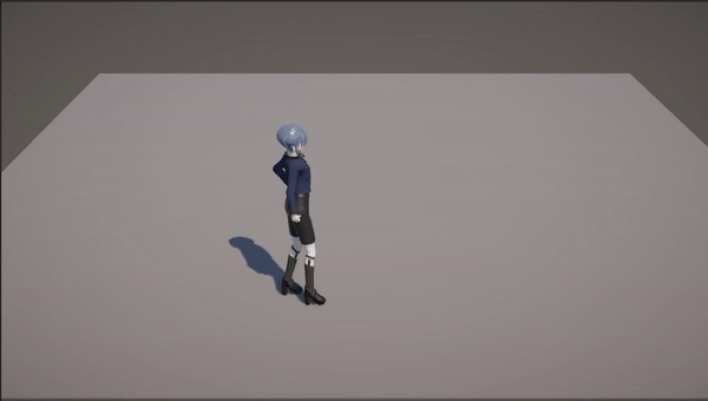
And like that the character is moveable!

I annotated all the code I wrote, but it is essentially the same as the code from the video guide.
I will program a new movement system as I don’t like this type of character controller that much. I want the movement to be from the camera’s perspective rather than the players.
Before I did the final movement script, I exported the materials for the hair and skin properly so that they were visible in Unity.
I used this video by “Rigor Mortis Tortoise” to bake the materials and export them.

Before I can bake the skin texture, I have to UV unwrap the retopology and add an image texture to the shader editor.
Baking is done on the cycles rendering engine and it creates an image texture from the rendered shader.

I messed up the first time I tried this as I left the clothes on, which left purple shadows all over the body. But all I had to do was hide everything except the retopology from rendering.
I stuck with this result after retrying a few times, I adjusted the skin shader to appear a little darker as it was quite light when baked.


For the hair I just stuck with a basic image texture as using blenders smart unwrap messed it up a lot.

The final result is fine for the unity environment. I won’t do this with the other textures as they are simple enough to keep as they are.

For the movement script I decided to do 8-way movement.
To help I used this video by AdamCYounis:

And this video by xOctoManx:


The new script used a Rigidbody to move the player, this meant that the speed had to be increased to account for friction.
The new script allows the player to move around the character in a way that is much easier to control and understand. (With a fixed camera.)


Overall, I’m happy about how well importing my character went and how stress free the process of getting it moving around was. (Ignoring how long importing the model took.)
The bit of C# I did do was quite simple, but I had fun using it, so I am definitely going to do more with it in the future.


Comments