Skills Gap 4: Learning Godot
- 723799
- Nov 19, 2023
- 4 min read

For this skills gap I will be exploring and learning how to use a new game engine.
Originally, I was going to use Unreal engine, but that didn’t work out so instead I’ll be using Godot.
The Godot engine is very lightweight and it’s easy to make portable. I heard it was similar to Unity so I hoped I'd have an easy time learning it.

Straight away after opening the editor I could see that it is very similar to Unity in terms of UI.

Godot uses a node system which begins as a root node that represents the scene. This node can then “branch off” into smaller nodes that can act as objects within the scene.
For example:

Here the node 3D acts as the root node and represents the 3D environment. Then the static body is a child of the root node, but it parents a collision shape which itself parents a mesh instance. Together they create a cube that has properties that can be changed by its individual nodes.
When creating a node, you select from this menu that lets you choose from many of the available node types.

Each node typically has its own properties that can be accessed in the inspector. For example, the mesh instance node has a property that allows you to assign and edit a mesh for it to display.

I start by making a simple scene in 3d with a player, floor, camera and light.


Next, I am going to get the player moving. It seems that with the latest build of Godot, they have removed the visual scripting. The college computer also doesn’t seem to run the .net version so I will try my hand at learning the Godot script.
Quite luckily when creating a script for the player, it turns out there is already a premade 3d movement script that you can automatically make.
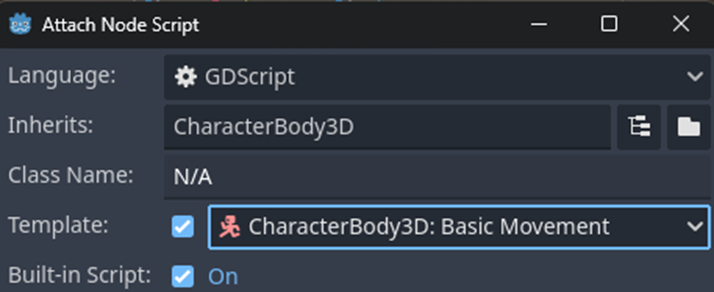
The script covers basic movement in a 3d space like walking and jumping. The GDScript language doesn’t seem too complex, it’s like a midway between python and C#. (I only have experience with those two.)

The only editing I did to the script was creating my own inputs. This is easily done through the project settings.

All the stuff I have learnt so far has just been from the Godot Docs website: https://docs.godotengine.org/en/stable/index.html

I decided to also make a script for the camera so that it would follow the player. I could always just parent it to the player, but that could be messy if I were making a more complex project.

In Godot you can make any node accessible under a unique name, which here lets me get the player’s position.

I decided to reuse some sprites from my “Another World” project to learn some of the 2D features in Godot. (Link to Portfolio)

With an AnimatedSprite3D node I can add sprite frames to it and have them appear in the 3D scene.


The animation menu is very useful in Godot. Almost any part of a node can be changed through an AnimationPlayer node.

Adding keyframes is quite easy, as while an animation is selected you can find a keyframe button next to any property in the inspector.

After making animations for 4-way movement, I made a floating animation on a separate AnimationPlayer node so I could play them simultaneously.
I have no idea if this was the best way to script the animations, but I used my limited knowledge from Godots documentation website to play the correct animation depending on the direction the player is moving.

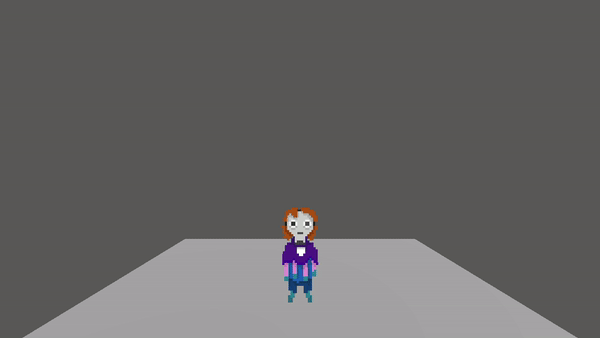
To finish off this skills gap I decided to make a minimap like I had in the “Another World” project I made in Unity.
But first I had to make a simple scene that could appear on this map.
I decided to create some cuboids to act like buildings and placed them randomly. They are made the same way as the floor, just with a different mesh.


I also got to learn about Godots environment and material assets.
I created an environment asset for the camera which allowed me to change the background colour.
And a Material asset for the buildings.

I enabled backlighting in the material to give the buildings a stylistic appearance.

To create the minimap I watched this video tutorial by “rayuse rp”:

I didn’t follow the tutorial completely, but I learnt how to add an extra camera feed to the UI.
This allows me to add a top-down camera that follows the player using the same script as the main camera.


Finally, I added a MeshInstance2D node to represent the player on top of the map and reduced the opacity of the viewport.
This skills gap has been very fun, Godot is a very fun engine that is quite easy to pick up and use. I’ll definitely do more work in Godot in the future as I’d love to learn more about what it can do.
I was actually quite surprised by how fast I was able to pick up how to use this engine, as I was a bit put off by the node system when I first saw it. Although I’m sure it helped that Godot had a lot of similarities to Unity, other engines I had used like Roblox Studio were much harder to use and learn.
GDScript was also very simple to use compared to C# that I had used before. I believe this is because of its similarities to the Python language, which I already learnt in school and also found to be easy to read and understand.


Comments