Skills Gap 2: Character Modelling - Part 2
- 723799
- Oct 20, 2023
- 2 min read

Check out part 1 for the blocking out stage: Link
I found sculpting is quite simple, and I was able to pick it up quite quickly.
The basic workflow for each part of the model is just:

Remesh

Smooth

Sculpt out details
(The tools I use are: Draw sharp, inflate, grab, clay strips and smooth.)


I faced my first challenge of this skills gap, that being hands.
It doesn’t help that my reference doesn’t provide a very good hand reference, but I’m able to work with this.

Firstly I Had to separate the fingers and line them up properly.

Then I the tutorial I was following had me use a remesh modifier instead of the normal remesh tool.

And when actually sculpting I had to deal with a really blocky hard to work with hand.
If I do this again in the future, I’ll make sure to spend more time blocking out the hand with a good reference. Otherwise, I’d be making much more work for myself.

Eventually I’m able to get an ok looking hand.

I’m not completely happy with it, but I’m hoping it will sort itself out later.
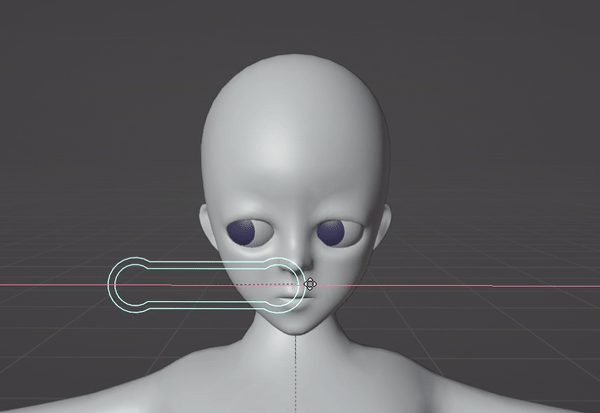
Next up is the head and this one is definitely time consuming, but I had quite a bit of fun doing it.

It starts off the same as the body, by remeshing and smoothing. Though unlike the body I used the reference a lot more.

This is because I wanted to keep the characters face shape and expressions recognisable to the source. There are definitely some compromises that had to be made, but I’m confident I did the best I could.


These eyes are just smoothed spheres with some of the faces on the front, coloured blue.
The challenge was to have their eye sockets match the expression on the reference.
This meant moving around eyelids and brow ridges to match the 2d ones.
This was a challenge, because anime characters realistically have huge bug eyes, so to get them to look natural in 3d is kind of hard.


Eventually I’m able to get a more natural look, but his eyes will probably remain lifeless for a while.


Last of all I worked on the ears that I had forgotten about.
To start I had to edit my brush so that it didn’t have any problems on the very thin ears.


Eventually I’m left with a pretty accurate ear.
Although, I’m not sure why, but it seems out of place on the head. I don’t mind too much as I’m sure that will be fixed once I do the retopology.


Before I start the retopology, I took the time to use some feedback from my friends at college to change some things.
In order to change large amounts of the model at once, I resized my brush and zoomed out. Like that I was able to do stuff like move the hips up to where they should be.

I also used the blob brush to make the limbs less thin. Eventually I was left with a much more proportionally accurate model.


Next blog post I'll have done the retopology and given it a simple rig.


Comments